Yoctobe · Promed HIS
Hospital information system for practices, clinics and hospitals
Promed HIS is Yoctobe's production hospital platform — seven modules on one patient record for practices, clinics and hospitals. Full product details, demos and module depth live on promedhis.com.

Hospital & clinic software
One practice management system, seven interconnected modules
Yoctobe builds Promed HIS as a single tenant — not a vendor suite held together with interface engines. Clinical, laboratory, pharmacy, imaging and finance teams write to the same patient record; a billing event traces back to the documented clinical encounter that created it; a validated lab result appears on the same timeline as the prescription that followed it. Each section below explains what the module does, who uses it, and how it connects to Promed EHR. For product screenshots and module-specific detail, visit Promed HIS modules.
Electronic health records
Promed EHR — hub of the practice management system
Promed EHR is the longitudinal record every other module writes to. It holds identity, encounters, vitals, diagnoses, documents, orders, results and billing context — with colour-coded clinical alerts on the patient summary so abnormal values surface before you open a sub-module. A clinician documenting a ward round does not chase lab results in a separate application or cross-reference a paper drug chart. Everything relevant to that encounter sits on one screen, maintained by one team, with one audit trail.
Who it serves: clinicians, nurses, medical records and administrators. What connects in: lab results post-validation, imaging reports, prescriptions, invoices and portal artefacts — all on one timeline with audit trails and role-based access.
- Patient summary — vitals, alerts, shortcuts to prescriptions, lab requests and visits
- Registration & demographics — identifiers, insurer data, portal enrolment
- Clinical forms — ICD-10, LOINC, dynamic fields and conditional logic
- Admissions & inpatient context — tied to bed and ward modules
- Interop — FHIR R4, HL7 v2 and REST API for external systems
- Compliance — GDPR, encryption, granular permissions and immutable audit log


Laboratory information system
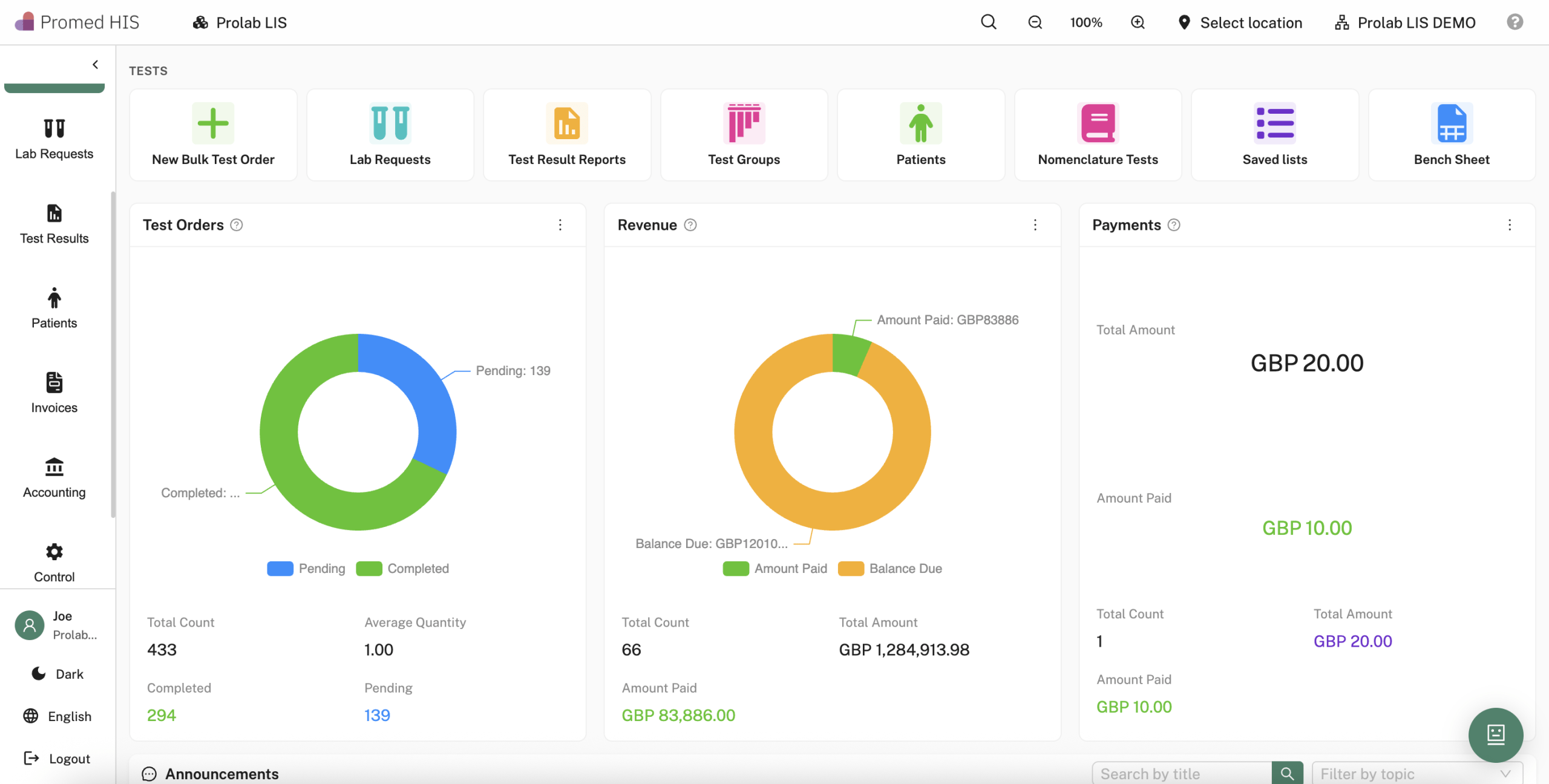
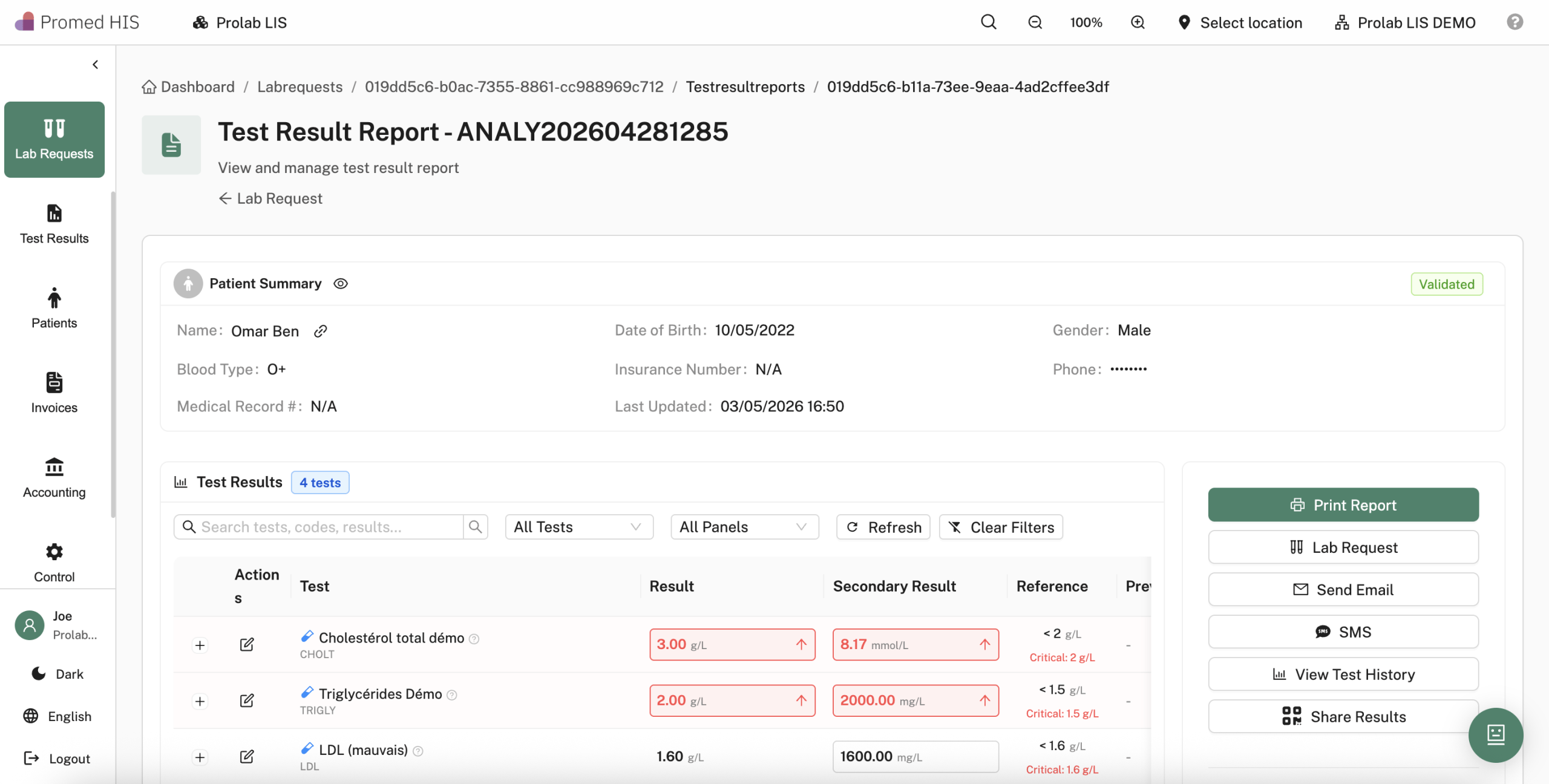
Prolab LIS — orders, traceability and LOINC-coded results
Prolab LIS is the laboratory information system inside Promed HIS — built by the same Yoctobe team that delivers analyser middleware and clinical integration. Orders created during a consultation carry the same patient ID as the EHR; technicians work sample barcode traceability, QC, validation and digital sign-off before results appear on the chart.
Who it serves: lab managers, biomedical scientists, phlebotomy and referring clinicians. Critical path: order → sample → analyser/middleware → validation → PDF report → EHR timeline → portal/QR — with critical values pushed back to the responsible clinician.
- Multisite lab dashboard — workloads, pending validation, turnaround KPIs
- Barcode sample management — collection, routing, rejection reasons
- Instrument interfacing — middleware for analysers and external labs
- QC & validation rules — edits, comments, electronic signatures
- Structured reports — panels, reference ranges, longitudinal trends on the EHR
- LOINC-coded results — interoperability-ready result storage
Pharmacy management
Pharmacy — electronic prescribing and the medication circuit
The pharmacy module closes the medication loop from the EHR: electronic prescribing with dosage and duration, real-time interaction screening against 1M+ drug pairs, formulary alignment (CIEL, RxNorm), stock impact on integrated ERP and inventory management, and dispensation traceability to the patient.
Who it serves: prescribers, clinical pharmacists, dispensary staff. Safety layer: severity-graded interactions with mechanism and review workflow before sign-off — ordonnance PDFs stored on the record without re-keying at dispense.
- E-prescribing — structured doses, routes, durations, renewals
- Interaction & allergy checks at point of prescribing
- Formulary & medical concepts — trust-wide preferred lines
- Inventory & expiry — linked to integrated ERP stock events
- Dispensing traceability — batch, lot, patient hand-off
- Billing sync — chargeable items flow to invoicing


Medical imaging · RIS/PACS
RIS/PACS — DICOM studies on the EHR timeline
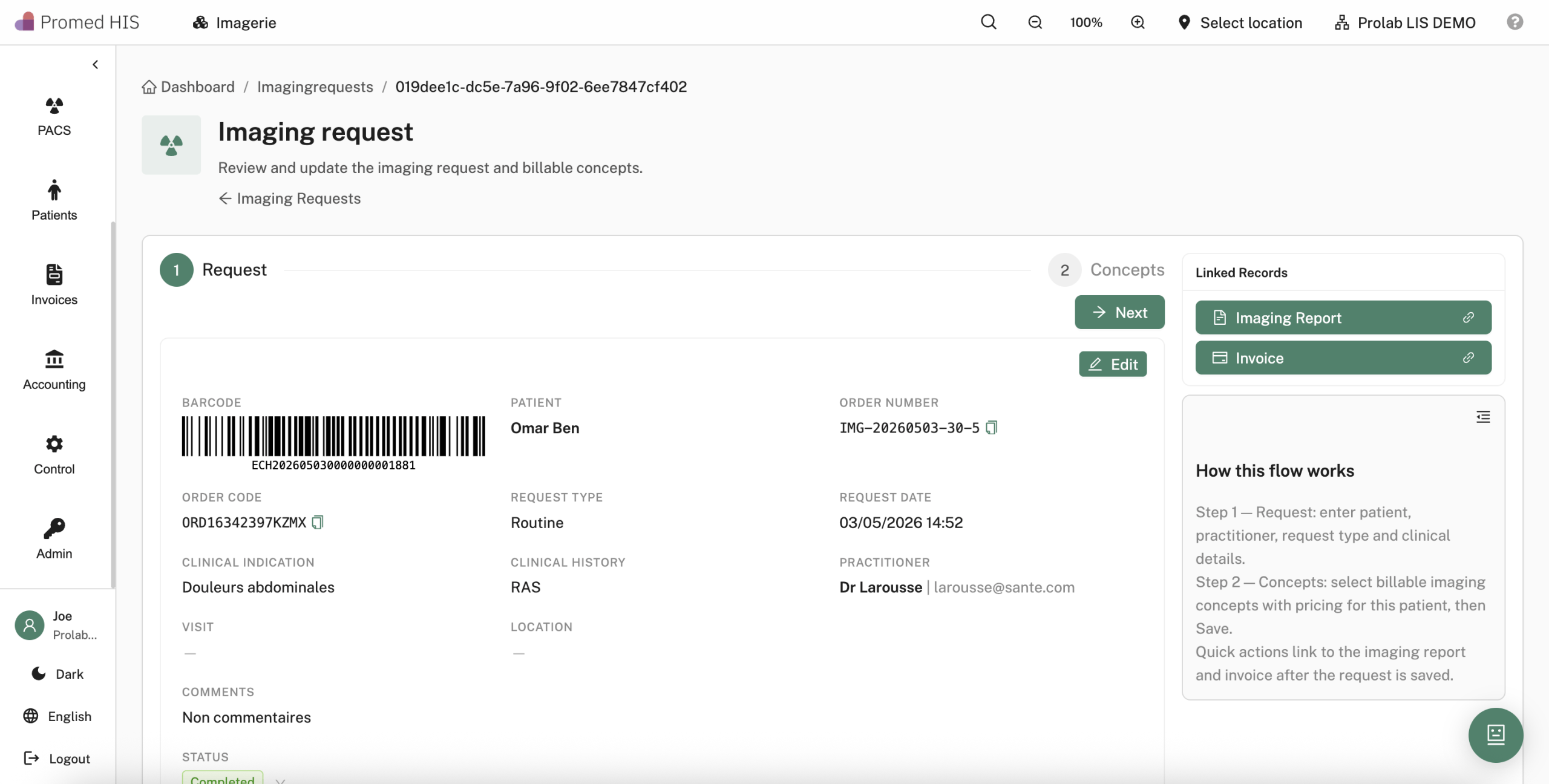
Integrated RIS/PACS keeps radiology inside the same practice management system as labs and medications. Referrers request imaging from the chart; radiology tracks worklists and acquisition status; readers report in an embedded DICOM viewer — X-ray, CT, MRI, ultrasound and mammography without a separate PACS session.
Who it serves: referrers, radiographers, radiologists, PACS admins. Patient access: portal and QR delivery of reports and key images alongside lab and pharmacy artefacts.
- Imaging requests — modality, priority, clinical indication from the EHR
- Worklist & scheduling — room, technologist, exam status
- DICOM viewer — windowing, series, measurements in workflow
- PACS storage — multisite, retention and access policies
- Radiology reports — structured text linked to the 360° view
- DICOM & interop — standards-based exchange where required

Clinical workflow
Visits & appointments — the active encounter layer
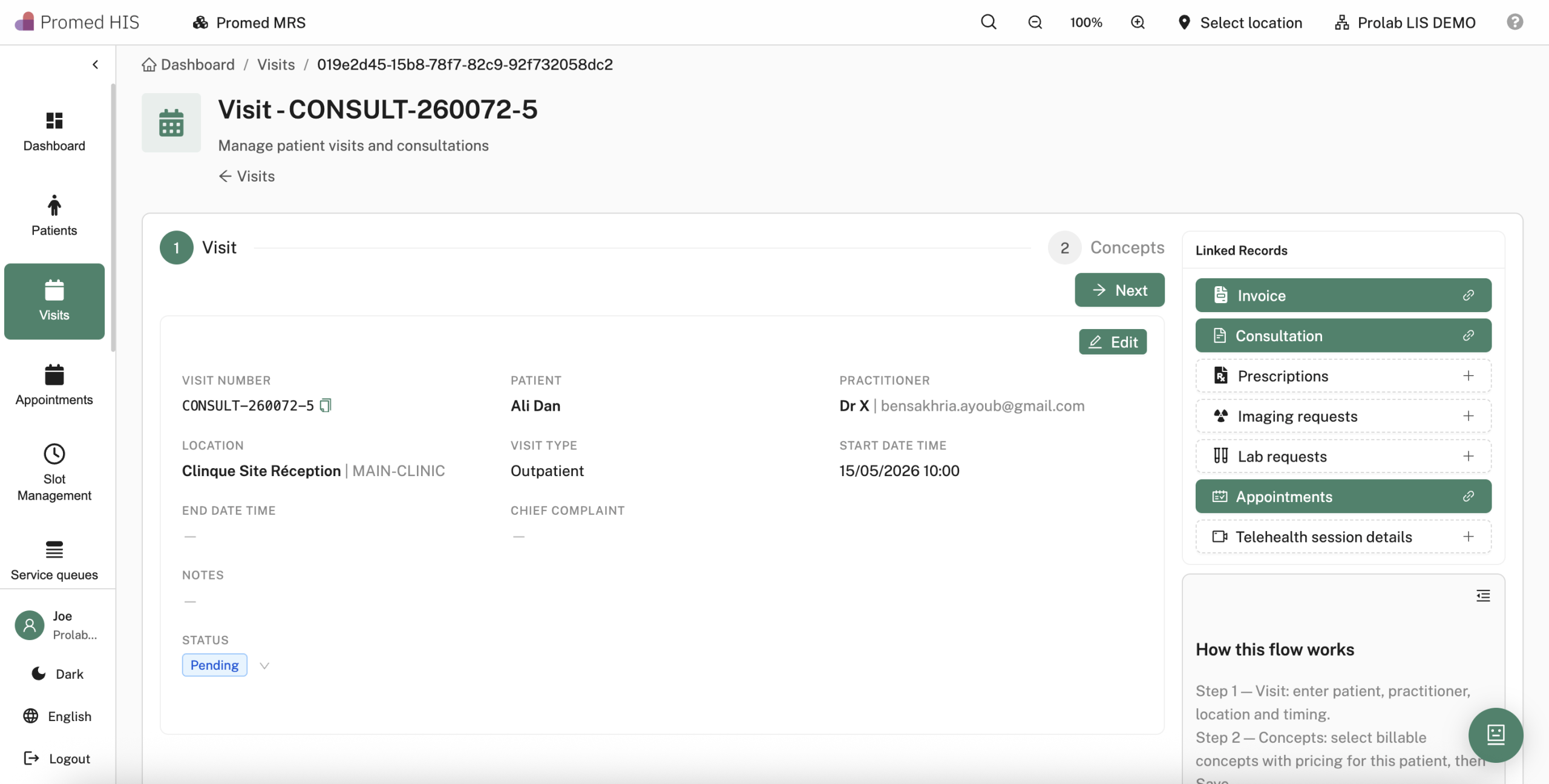
Visits are where clinical data is captured: chief complaint, vitals, examinations, diagnoses, care plans and orders. Appointments and queue management feed that encounter — in-person or via teleconsultation (Zoom, Google Meet, Microsoft Teams) on shared multisite calendars with SMS and email reminders.
Who it serves: front desk, nurses, clinicians, service-line managers. Downstream: completing a visit triggers lab orders, imaging requests, prescriptions and billable lines without duplicate entry.
- Structured visit workflow — intake → assessment → plan → orders
- Vitals & alerts — thresholds reflected on the patient summary
- Multi-practitioner scheduling — resources, locum, cross-site booking
- Queue & triage — waiting-room displays and priority logic
- Teleconsultation — embedded video, same record as face-to-face
- Queue-to-billing — visit status drives invoice readiness
Appointment management on Promed HIS · Telehealth on Promed HIS

Revenue & practice management
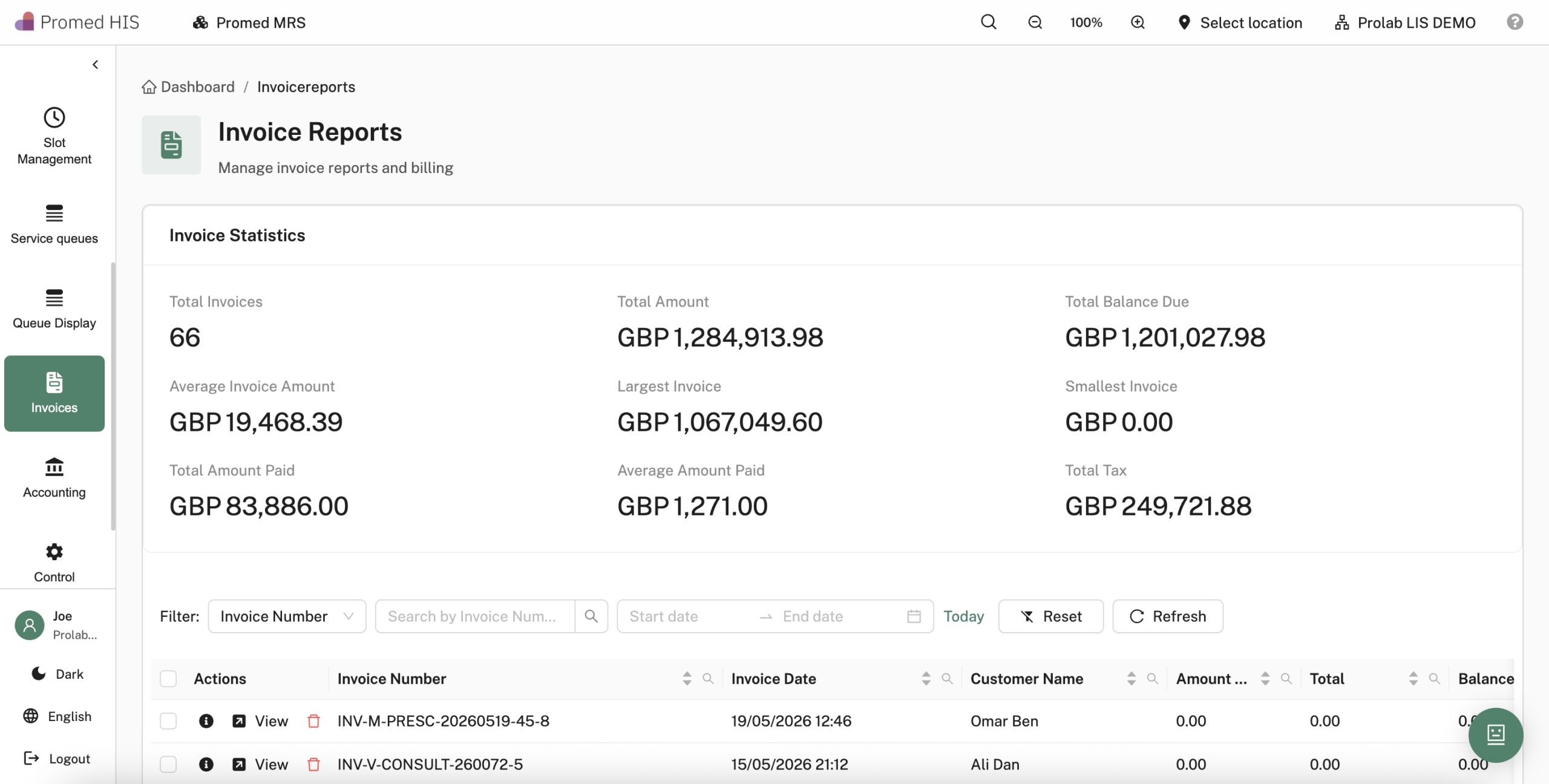
Billing — pricing tiers, invoices and receipts on the EHR
Billing inside Promed HIS replaces spreadsheet tariffs and external accounting exports for day-to-day healthcare revenue. Configure pricing tiers and insurer-specific rates once; generate line-item invoices from completed visits with tax, payment terms and paid/unpaid status visible on the patient record.
Who it serves: finance, reception, contract managers. Accounting angle: native to clinical events — charges originate from documented encounters, not a separate billing product re-keyed from ward rounds.
- Pricing tiers — standard, discount, insurer-specific rates
- Rule engine — bulk refresh of tariffs across services
- Invoice reports — billing codes, quantity, tax, totals
- Receipts & print — invoice and receipt from one screen
- Balance tracking — paid, partial, unpaid at a glance
- Integrated ERP — stock-related charges and consumables

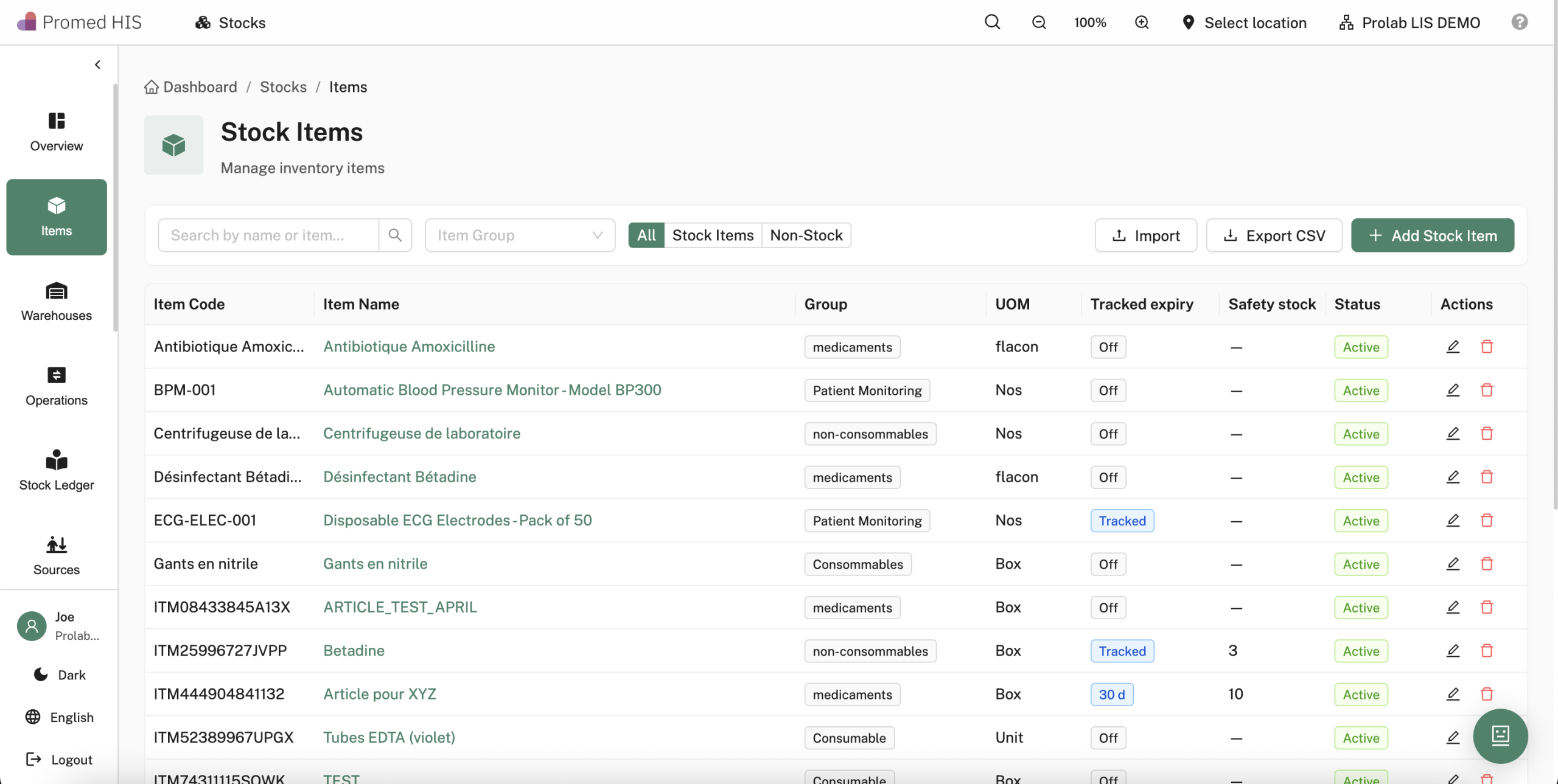
Healthcare stock management
Integrated ERP and inventory management
Promed HIS integrated ERP and inventory management covers pharmaceutical and consumable stock — reorder thresholds, batch and expiry traceability, supplier purchase orders and multisite warehouse visibility. Dispensing and clinical consumption events update levels in real time instead of month-end stock takes.
Who it serves: pharmacy stores, procurement, finance operations. Integration: prescription dispense reduces on-hand stock; billing can reference consumable lines tied to visits.
- Pharmacy & consumables — SKUs, locations, par levels
- Expiry & lot traceability — FEFO-friendly workflows
- Supplier & PO management — approvals and receiving
- Multisite console — transfer and network-wide alerts
- Alerts — minimum stock and near-expiry notifications

RAUTOR — AI agent inside the EHR
RAUTOR is clinical AI embedded in Promed EHR — not a sidecar chatbot. It fetches patient context, drafts operational and clinical reports, and analyses lab trends to support review. It does not diagnose, prescribe or replace clinician judgement (AIaMD positioning: assistive under human control).
Who it serves: clinicians and medical leadership evaluating safe AI in workflow. Data boundary: reads the same EHR timeline; does not create a parallel patient store.
- On-demand patient context from the record
- Report drafting from platform data
- Lab trend analysis for clinician review
- Zero extra login — launched from the chart
- Never autonomous clinical decisions
Inpatient & patient flow
Bed management & queue displays
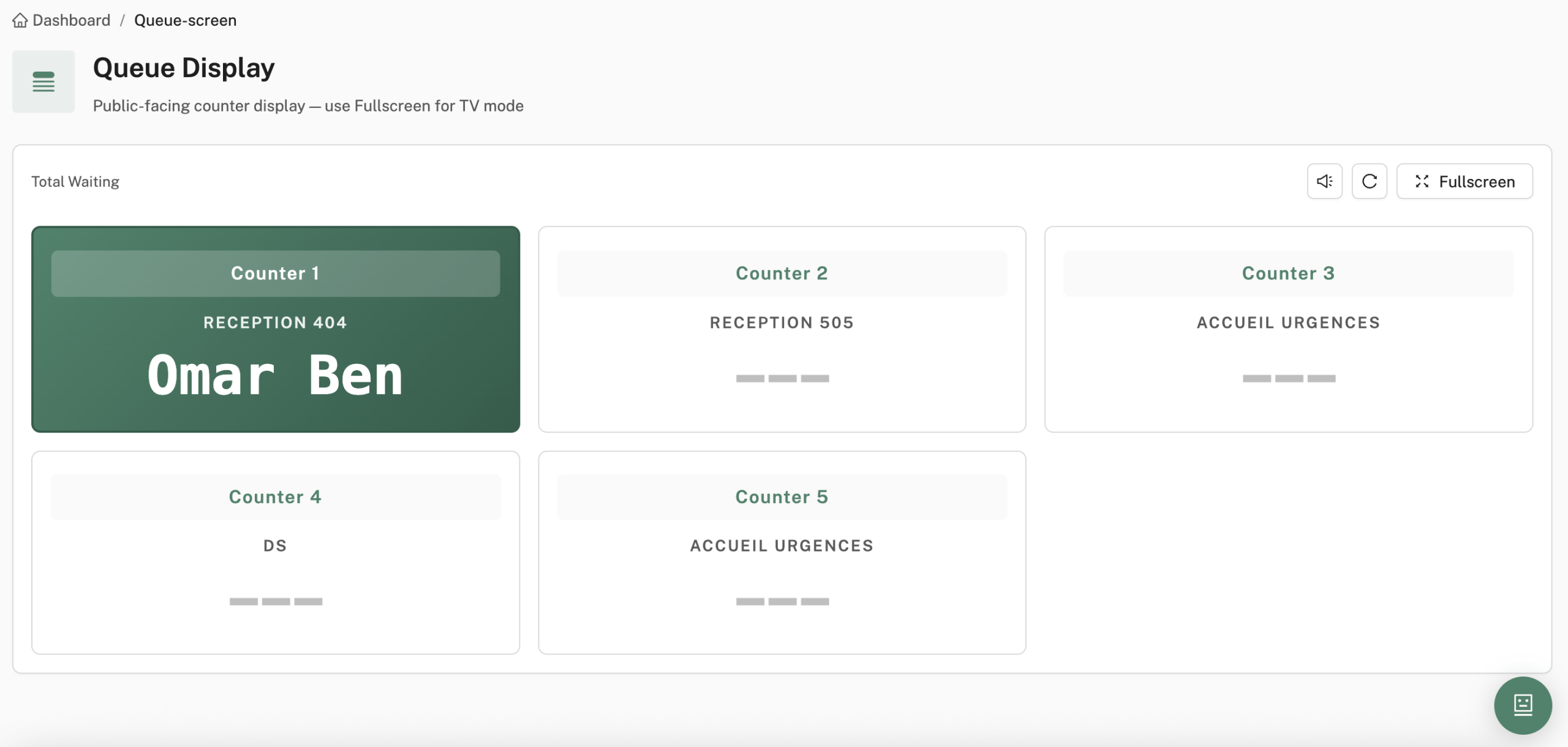
Hospital operators get ward-level visibility without another vendor: real-time bed maps, admission/transfer/discharge tied to the EHR admission, plus queue screens and triage logic synced with appointments and registration.

Ward clerks updating bed status on a whiteboard while outpatients wait on a paper ticket — the two flows never meet, and finance learns about a discharge when billing chases the ward days later.
Promed HIS links inpatient bed maps and ADT to the same admission on Promed EHR, while queue management and public displays pull priority and estimated wait from appointments and registration — front desk, nursing and finance read one patient flow.
- Bed map — occupancy, patient assignment, length of stay
- ADT workflows — admit, transfer, discharge with billing hooks
- Queue management — public displays, estimated waits, priority rules
- Multisite inpatient — network capacity from one console
Audience
Who the practice management system is for
Promed HIS suits organisations that need a unified hospital or clinic platform — from single-site GP groups to multi-site providers with inpatient beds, pharmacy and laboratory workflows.
Hospital and clinic groups
Trusts, private hospital groups and specialist clinics that outgrow legacy PAS/EHR combinations. Promed HIS gives medical directors a single source of truth for admissions, ward rounds, discharge summaries and operational reporting — without exporting spreadsheets for board packs.
Primary and community care
GP practices, polyclinics and community services that need appointments, chronic disease management and e-prescribing on the same record. Clinicians document visits once; reception, nursing and pharmacy see the same chart in real time.
International providers
Healthcare groups outside the UK who require configurable workflows, multi-language forms and GDPR-aligned hosting. Yoctobe configures Promed HIS for local billing rules, insurer integrations and regulatory audit requirements in each territory.
Laboratory-connected sites
Facilities running Prolab LIS or Yoctobe analyser middleware where orders, barcoded samples and validated results must share the same patient identifier from registration through release — without brittle overnight HL7 batches.
Differentiators
Why providers choose Promed HIS
Yoctobe builds and supports the platform directly — no reseller layer, no opaque roadmap and no dependency on a generic ERP dressed up as an EHR. The team that designed the modules supports your implementation and stays through post-go-live.
One patient timeline
Clinical notes, orders, lab results, imaging requests, prescriptions and invoices attach to the same encounter — on one screen, maintained by one team. Staff stop chasing data across disconnected modules from different suppliers.
Configurable without code
The clinical form builder, concept catalogue and workflow engine let specialty teams adapt documentation and pathways without waiting for a vendor change request.
Auditable by design
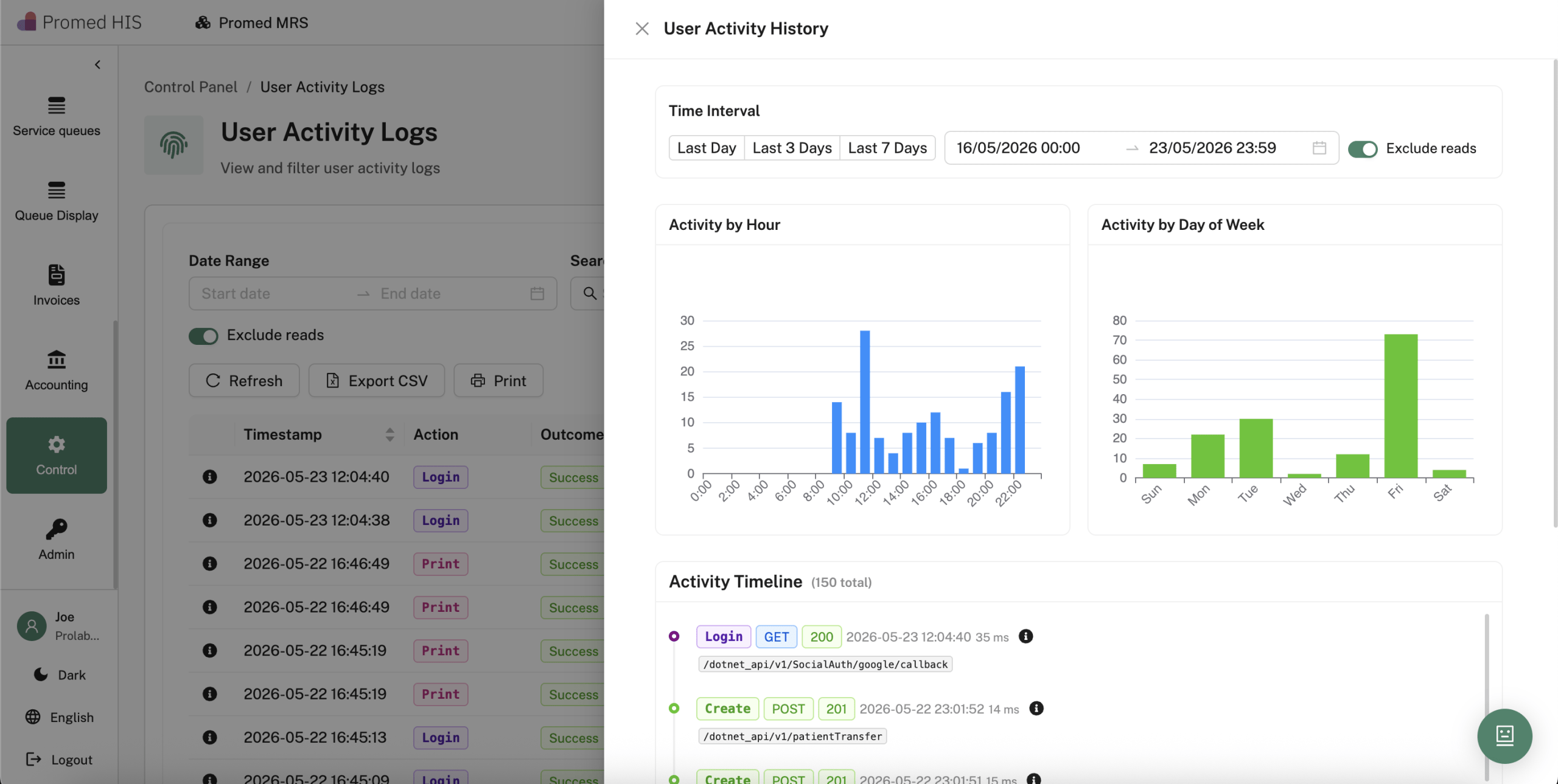
User activity logs, electronic signatures and role-based access controls support CQC inspections, ISO 27001 programmes and internal governance reviews.
Native lab integration
Promed HIS and Prolab LIS share architecture from Yoctobe — lab orders, barcoded samples and validated results flow to the chart without brittle HL7 patches.
Pharmacy and stock
E-prescribing links to dispensing workflows and multi-location stock management — reducing medication errors and stock-outs on busy wards.
Direct vendor support
Implementation, integration and ongoing support come from the Yoctobe engineering team in Liverpool — the same people who designed Promed HIS and Prolab LIS. When a module behaves unexpectedly, you reach the team that built it, not a helpdesk reading from a script.
Delivery
Yoctobe implementation approach
Yoctobe deploys Promed HIS in phased releases so clinical teams are never asked to switch everything on a single weekend. Discovery maps your specialties, billing models and existing interfaces; a sandbox environment mirrors production workflows before go-live.
- Discovery and workflow mapping — site visits or remote sessions with clinical leads, nursing, pharmacy and finance to document current-state processes and priority modules
- Sandbox configuration — forms, concept catalogues, appointment templates and billing rules loaded into a test tenant for super-user validation
- Data migration — patient demographics, active problems, medication lists and open appointments migrated with reconciliation reports and sign-off checkpoints
- Integration — HL7 and FHIR interfaces to Prolab LIS, imaging, insurer portals and Yoctobe middleware; message monitoring from day one
- Training and hypercare — role-based training for clinicians, administrators and IT; on-site or remote support during the first weeks of live operation
Typical hospital deployments run twelve to twenty-four weeks depending on site count and migration scope. Clinic-only rollouts can go live in eight to twelve weeks when data volumes and integrations are limited.
Questions
Frequently asked questions
Can Promed HIS replace our existing PAS and EHR?
Yes. Promed HIS covers registration, scheduling, clinical documentation, inpatient management, pharmacy, billing and reporting in one practice management system. Yoctobe maps your current systems during discovery and plans a phased cutover — often starting with outpatient clinics before expanding to inpatient and ancillary services.
How does Promed HIS integrate with our laboratory?
If you run Prolab LIS, integration is native — orders and results share patient identifiers and LOINC-coded structured data. For third-party LIS platforms, Yoctobe builds HL7 v2 or FHIR interfaces with monitoring and error quarantine. Analyser connectivity is handled by Yoctobe middleware where direct instrument feeds are required.
Is the platform suitable for UK GDPR and NHS data handling?
Promed HIS is designed for UK GDPR compliance with role-based access, audit trails, consent management and configurable data retention. Hosting options include UK-based cloud infrastructure. Yoctobe holds ISO 27001 certification and follows IEC 62304 software lifecycle practices for regulated healthcare delivery.
What does a demonstration include?
A typical demo walks through patient registration, a clinical consultation with form-based documentation, lab ordering, result review, e-prescribing and invoice generation — using workflows relevant to your specialty. Yoctobe can also show bed management, queue screens and integration dashboards if those modules are in scope for your organisation.
Next step
See the practice management system with Yoctobe
Clinics often deploy EHR, visits and billing first — hospitals add LIS, RIS/PACS, inpatient and ERP on the same tenant. Request a demo and we will walk through the modules relevant to your organisation, using your specialty workflows, not a generic script.